
Invoices and bills
Raise customer invoices and record supplier bills against the same customer and supplier records. Amount due and payment status stay with each document.
AlgoSuite is business software we are building at UnityAlgo. Orders, stock, invoices, and your team's records live in one system, so nobody retypes anything.
AlgoSuite is still in development. Talk to us and we will tell you honestly where it stands.
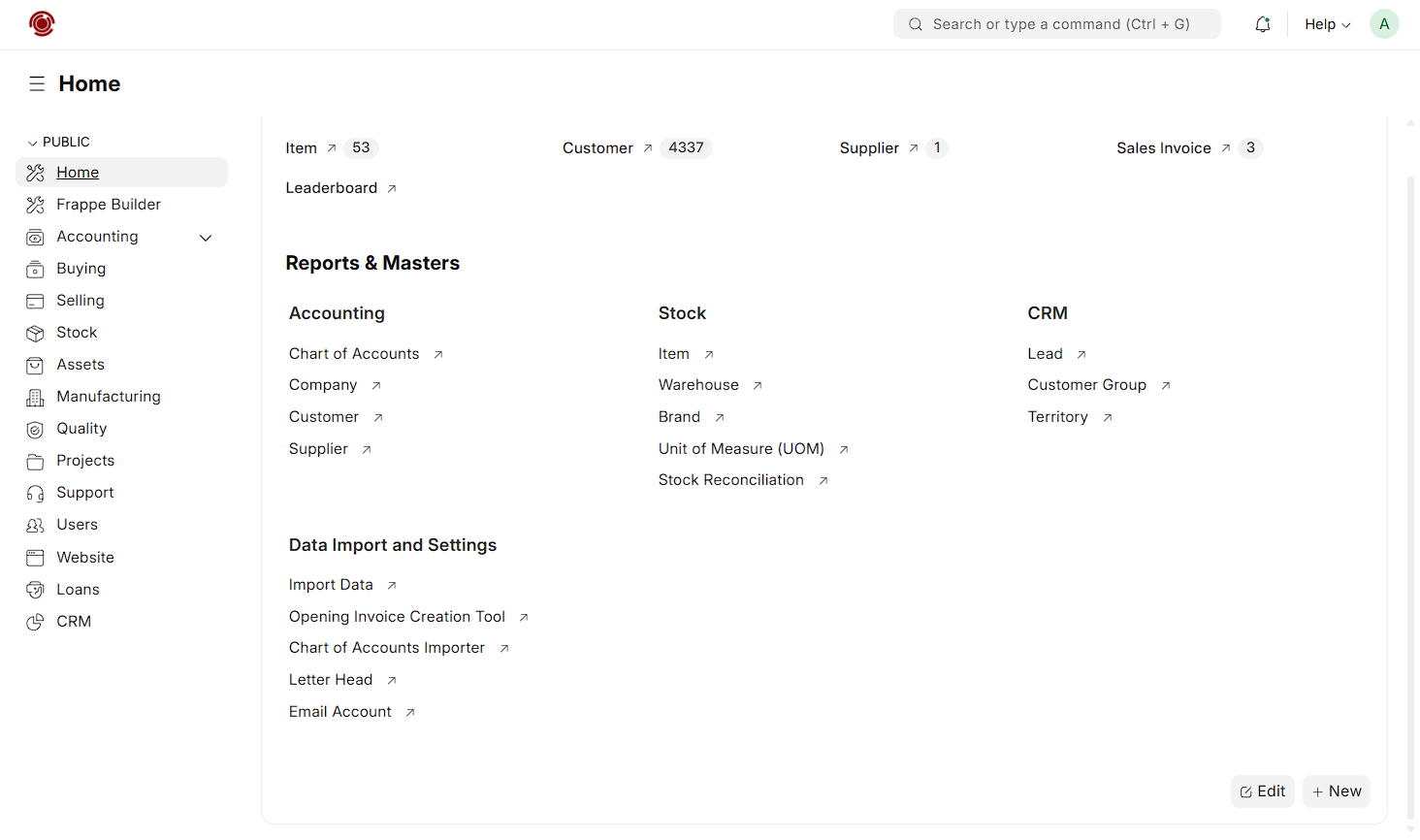
The AlgoSuite home workspace, from a preview build.
ERP stands for enterprise resource planning. In practice it means finance, stock, sales, and HR share one database instead of each keeping their own. Here is what that looks like day to day.
Why we are building it
A single sale touches stock, cash, and someone's to-do list. When each lives in a different tool, people fill the gaps by hand. AlgoSuite starts with those gaps.
Keep the customer, item, and transaction records behind your work together, so each team can see the same story.
Plan workflows that carry information between departments, instead of copying it into another spreadsheet.
Bring operational and financial context together to help people make better-informed decisions.
Pick the part of the business you care about most. Scope and availability are not final.
Connect purchase requests, supplier quotations, purchase orders, and receipts.
Ask about ProcurementConnect quotations, customer orders, POS checkout, detailed invoicing, and payments with stock and accounting.
Ask about SellingKeep leads, opportunities, customer conversations, and follow-ups in one shared view.
Ask about CRMBring invoices, payments, expenses, and financial reports together around connected records.
Ask about AccountingTrack items across warehouses, with receipts, transfers, and replenishment planning.
Ask about StockPlan materials and production with bills of materials, work orders, and production schedules.
Ask about ManufacturingOrganise project tasks, responsibilities, timelines, and costs so teams can follow progress.
Ask about ProjectsConnect checkout, customer receipts, and retail payments with stock and accounting records.
Ask about Point of SaleRecord inspections, quality checks, and corrective actions across purchasing and production.
Ask about QualityManage customer issues, ticket ownership, and resolutions with a shared communication history.
Ask about SupportPeople & HR is also part of the planned suite. Final module scope and availability will be confirmed as development progresses.
Choose an area to see what we are planning to cover. Screenshots come from preview builds and may change.
Bring invoices, bills, and payments into the same conversation. Give your finance team the context behind the numbers, without chasing updates from every department.
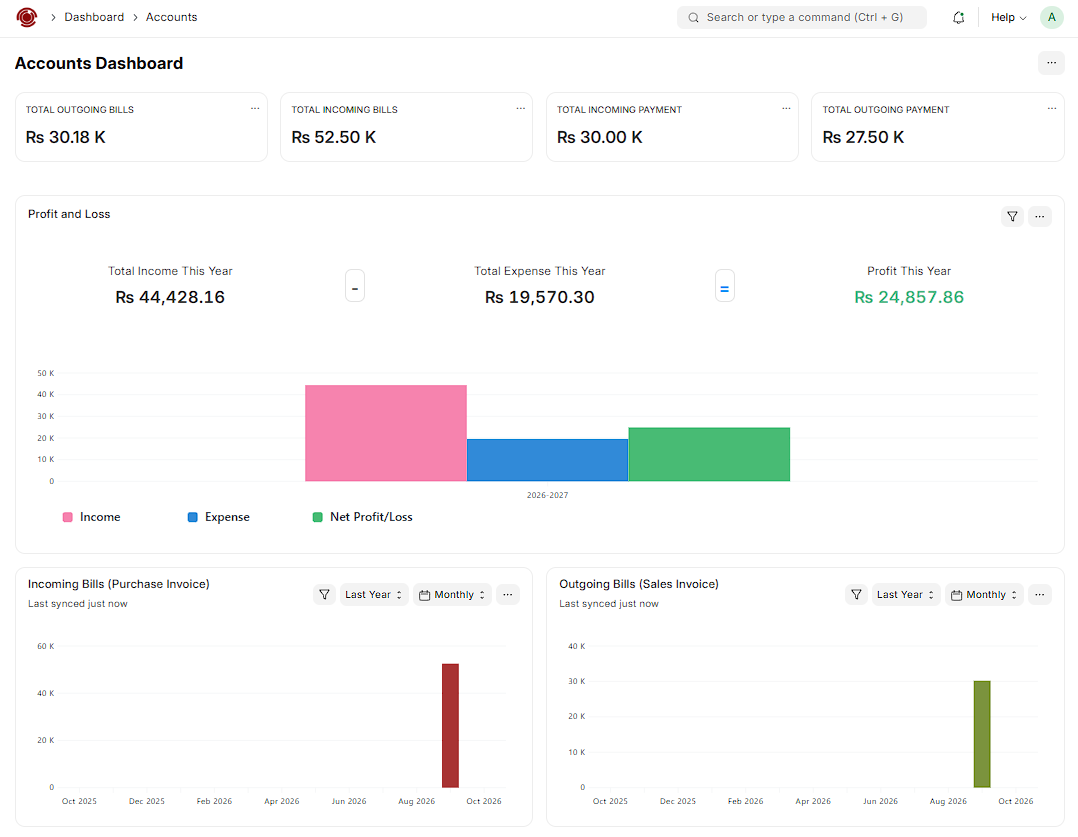
From a preview build. Select to enlarge.
Raise customer invoices and record supplier bills against the same customer and supplier records. Amount due and payment status stay with each document.
See money received and money paid beside the bills they settle, so the next payment decision has context.
Track who owes you and what you owe, with outstanding balances visible without a separate ledger sheet.
Read income and expenses side by side with net profit or loss for the period you pick.
Organise the records behind the numbers, so each figure maps to an account you can trace.
Compare monthly sales and purchase invoices over time to spot seasonality and slow payers.
A customer order becomes an invoice. A supplier bill creates an amount to pay. Payments and expenses feed the financial picture, and every number traces back to the work behind it.
This is the everyday workflow we are designing around. Each team does its part, and the order details travel with the work.
Sales
Customer details, agreed prices, and items stay with the order.
Inventory
The warehouse sees what needs to be reserved and prepared.
Operations
Dispatch and fulfilment follow the same order context.
Finance
Invoicing and payment tracking connect back to the sale.
The aim is simple: anyone can see where an order is, from the first call to the final payment.
These are the kinds of business we are shaping AlgoSuite around. If yours is different, tell us.
Bring purchasing, stock, customer orders, and invoicing into a connected working day.
Talk about your businessExplore how material records, purchasing, and operational planning can work together.
Talk about your businessKeep customers, team records, everyday tasks, and financial administration in the same place.
Talk about your business
UnityAlgo writes custom software and implements ERP for clients. AlgoSuite comes out of that work: the same questions keep coming up about who needs which information, what happens next, and where a process gets stuck.
Permissions, data handling, and system connections belong in the requirements conversation from the beginning.
Meet UnityAlgoA new system changes how people work, not just which screen they use. This is the order we would suggest.
Map the processes you use today, the handoffs that slow you down, and the records your teams rely on.
Choose the priority workflows, review your data, and define what a useful first rollout should include.
Plan configuration, data migration, and training around the people who will use the system every day.
Review the first phase, resolve friction, and plan additional workflows as your business needs develop.
Need something sooner? We also work on custom software and ERP implementations.
Explore our servicesWhat tools do you use, where does work get stuck, and what do you need next? We will tell you whether AlgoSuite is a fit or whether something else would serve you better.
Ask about modules, availability, or implementation. You do not need a full requirements list.
Contact usAlgoSuite is in development. Launch timing and pricing are to be confirmed.